September 29th, 2011
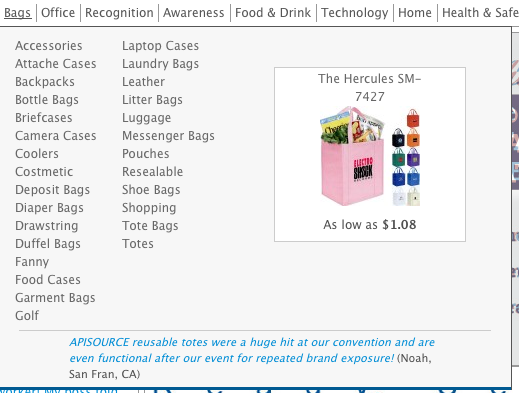
I don’t often get to do too much front-end work these days, but this is a project I did in conjunction with another developer at SFC for two different clients who both wanted what we’re calling “exploded nav.”

Basically they want the entire category tree to be shown in a nested box with columns instead of several layers of popup, with the ability to set a featured product or product image, and a testimonial quote at the bottom.
All we had to do was add another tab for Nav settings to the Category UI in admin and adjust the frontend styling accordingly. We’re still dealing with IE of course so the columns were tricky, but this particular client’s requirements simplified it because they only wanted the second level categories shown.

Most of the work I’ve been doing is with spreadsheets and imports, so it was a nice change to get to work on something so visual.
Posted in Posts | No Comments »
August 25th, 2010
Just completed a quick project for a client who wanted to capture the referrer information in completed orders in magento. Integrated that with my employer’s reporting module to display not only the full url of the referrer but extract the search terms where applicable. I think this is the most immediately useful module coding I’ve done.

Tags: development, ecommerce, magento
Posted in Posts | No Comments »
August 16th, 2010
This is a project I’m working on for my current employer, Storefront Consulting. The client requested we modify the core Magento category filtering to allow for several features unavailable in the core version of Magento Enterprise. They wanted to be able to apply multiple options under the same filter, and make the options available throughout the site, not just in the catalog module.
Here are some screen shots from the demo version with test products.
Here’s the template for non-catalog pages:

And here’s the template for catalog pages and the “view all” category page:

Tags: development, ecommerce, magento, navigation
Posted in Posts | No Comments »
May 19th, 2010

Latest work project. Implementing an unsliced PSD from our designer. This is an abandoned Drupal project assigned to me so there was a fair amount of cruft in the source. Basically I built the static site then replaced the dev site’s css with mine, tweaking class names and wrappers as needed to compensate for Drupal’s bizarre template system.
I liked the simplicity of the slideshow over my last attempt, requiring no counters or explicit element IDs.
var slider;
$(document).ready(function() {
slider = setTimeout(doSlider, 6000);
$('.slider>a:first').show();
});
function doSlider(){
if($('.slider>a.current').next()[0].tagName != "A"){
$('.slider>a.current').fadeOut(). removeClass('current');
$('.slider>a:first').fadeIn(). addClass('current');
$('.slider-footer>a.current'). removeClass('current');
$('.slider-footer>a:first'). addClass('current');
} else {
$('.slider>a.current').next('a').fadeIn(). addClass('current').prev('a').fadeOut(). removeClass('current');
$('.slider-footer>a.current').removeClass('current').next('a'). addClass('current');
}
slider = setTimeout(doSlider, 6000);
}
Tags: css, drupal, javascript, jquery, slideshow, theme
Posted in Posts | No Comments »
April 15th, 2010

This is the model for what was supposed to be an information site sort of like a wiki but in which the information is updated every couple years at most. The project is currently on hold and hopefully will not include such a silly navigation system. Nonetheless I wanted to share the model and how I implemented it here because of the unusual nature.
Naturally I could have made it an image map or use flash (gross to both) but I wanted to keep it simple and accessible, so I used javascript and math.
jQuery(document).ready(function(){
$("#circle").mousemove(function(e){
var center = $(this).offset();
center.left += 242;
center.top += 242;
var mouse = {'left': e.pageX, 'top': e.pageY};
var distance = Math.sqrt(Math.pow(mouse.left - center.left, 2) + Math.pow(mouse.top - center.top, 2));
var angle = Math.atan2( mouse.left - center.left, mouse.top - center.top ) *(180/Math.PI) + 180;
var debug;
if(distance < 60){
debug = "self management";
} else if(distance < 90){
debug = "nps universal";
} else if(distance < 197){
if(angle > 325 || angle < 35){
debug = "i";
} else if(angle < 325 & angle > 252){
debug = "ii";
} else if(angle < 252 & angle > 180){
debug = "iii";
} else if(angle < 180 & angle > 107){
debug = "iv";
} else if(angle > 35 & angle < 107){
debug = "v";
}
} else if(distance < 228){
debug = "supervision etc";
}
console.log(debug);
});
})
It's more of a proof of concept because the project is on hold, but I found the solution fairly elegant.
Tags: circle, javascript, math, navigation
Posted in Posts | No Comments »
March 17th, 2010

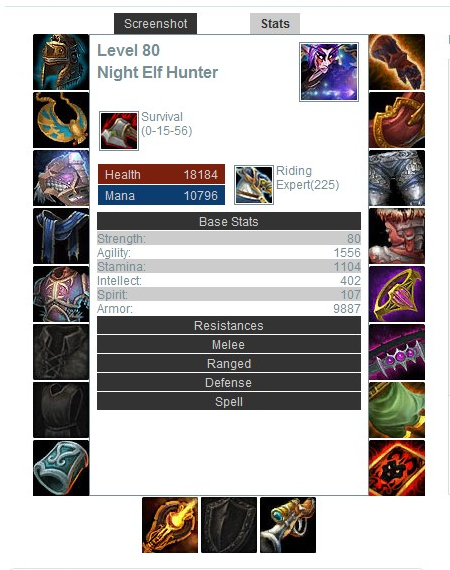
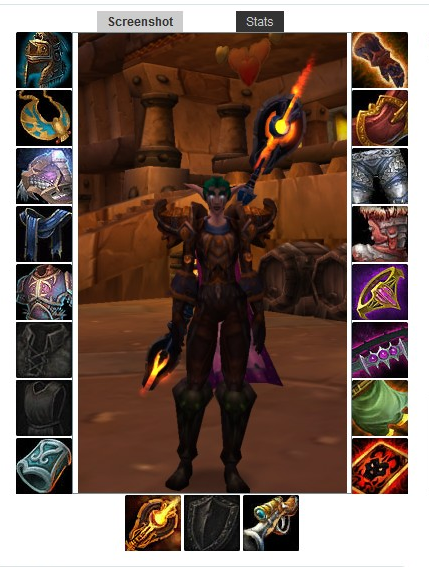
This is a freelance project I did for a site called “The Lazy Player” which sells world of warcraft leveling services and accounts. The site is built on Magento and there are several parts to my contribution to the site.
The first is an armory link that curl’s the xml data from Blizzard’s “Armory” service into the product listing and displays it on the product page in an easy to read format, using jquery and wowhead‘s “powered by wowhead” item tooltips.
The second part is a backend script for magento’s admin panel that pulls the list of wow servers from blizzard and populates the drop-down of custom options for leveling services so that the list can be easily updated. It also allows for different pricing options based on the type of server chosen.
The final component is a script to generate custom options for partial leveling services that will adjust the price of the service in magento based on the customer’s start and end level. The values are calculated from cost per group of levels (ex: 21-30) into a full range of level choices for start and a choice for each group, all of which are given specific negative price values that will adjust the final cost of the service product in magento.
Tags: armory, jquery, magento, world of warcraft
Posted in Posts | No Comments »
March 5th, 2010

This post is a little behind, but two weeks ago I and most of the IT staff at eppley.org launched our new website. I cannot take credit for the design, but the jquery slideshows and the setup and conversion of the design for magento is all my handiwork.
Tags: ecommerce, eppley, magento
Posted in Posts | No Comments »
February 2nd, 2010
I spent most of the day today installing wordpress on the site and converting the old content to work on it. It’s pretty much ready to go as-is, but I’m sure it will need the occasional tweak. The purpose for this change is so I can document my projects as I work on them. It might be confusing because http://drogers.net/blog goes to my tumblr, and I’ll keep it that way for the sake of old links, but the site itself will be an actual log of my activity, while the tumblr has always been merely an aggregation of things I find worth sharing.
Tags: news, tumblr, website, wordpress
Posted in Posts | No Comments »
January 7th, 2010
Disappointed to find that php’s date() function has no roman numeral conversion, nor is there any preexisting function to do so, I whipped up my own today.
"V", 10 => "X", 50 => "L", 100 => "C", 500 => "D", 1000 => "M");
$rom[100] = substr($dec, -3, 1);
$rom[10] = substr($dec, -2, 1);
$rom[1] = substr($dec, -1);
$m = substr($dec, 0, -3);
foreach($rom as $key => $base){
switch($base){
case 0:
$rom[$key] = "";
break;
case 9:
$rom[$key] = $table[$key].$table[$key*10];
break;
case 4:
$rom[$key] = $table[$key].$table[$key*5];
break;
case 5:
$rom[$key] = $table[$key*5];
break;
case $base < 4:
$rom[$key] = str_repeat($table[$key], $base);
break;
case $base > 5:
$rom[$key] = $table[$key*5].str_repeat($table[$key], $base - 5);
break;
}
}
return str_repeat("M", $m).implode($rom);
}
Tags: function, php, roman numerals
Posted in Posts | No Comments »